About a year ago, I bought a new-to-me car. The car is a 2015 Skoda Octavia which came with an “infotainment” system with an 8″ screen, a USB input and Bluetooth to connect your phone to it. It also has an feature called SmartLink, which is Skoda’s name for a feature that enables Apple CarPlay and Android Auto. Other cars have the same feature with different names. Apple CarPlay and Android Auto offer you a cut down interface for your phone which can be controlled from your car’s infotainment system’s screen. From hereon in, I’m just going to mention CarPlay, but you can assume that everything in this article that applies to CarPlay most likely applies to Android Auto as well. With CarPlay, you can run:
- Satellite navigation apps like Waze, TomTom, Google Maps and Apple Maps
- Audio apps like Spotify, Apple Music, various radio apps, Podcasts and Audiobooks.
- VOIP apps like Teams, Zoom and Skype
- Parking apps like RingGo and JustPark
- Apps to control parts of the car itself, like the radio or climate control system, if your car supports it
from your phone, displayed and controlled on your car’s infotainment system’s screen. The best thing about CarPlay, for me, is that you’re not stuck with the navigation system that your car comes with. The Skoda one that my car came with is adequate but it doesn’t get traffic updates, give me warnings about roadworks or accidents, map updates are only released every six months and need to manually installed and the directions sound robotic and are at times unclear. CarPlay addresses all of that and more.
You can connect your phone to your car via CarPlay using either a cable via the car’s USB port or, if the car supports it, wirelessly. However, Wireless CarPlay is a relatively recent development and the infotainment system in my car came out before the Wireless version of CarPlay became available. Connecting my phone to the car with a cable is fine, it works perfectly well but there are a couple of disadvantages. Firstly, it’s one more thing you need to remember to do; it’d be nice just to get into the car, turn it on and have the phone connect to the entertainment system without having to do anything else or while it’s still in my pocket. Secondly, the USB port in the car only provides 5W of power, so it’s slow to charge the phone. I have a MagSafe charger in my car mounted on a clip by Brodit which provides up to 15W of power so ideally, I’d like to continue to use that.
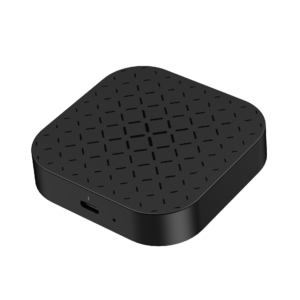
I found out that there were dongles which could convert the car to be able use Wireless CarPlay, so I started to do some research into them. While doing that, I found out that there were also devices which can act as Wireless CarPlay dongles, but can also do a little bit more as well. What I’m reviewing today is one of those devices. So, this is it: the Carlinkit CPC200-ibox, or the Tbox-MINI Basic as it calls itself in its own menu system. It looks like this:
It comes in a surprisingly nice box with a USB-C to USB-C cable, a USB-A to USB-C cable and a little instruction booklet. It looks remarkably like a v2 or v3 Apple TV and is probably about 2/3 the size of one of those devices. It has a single USB-C port, a TF card slot and a recessed reset button. It has a couple of small LEDs on the front to let you know when it has power and when it’s booting. It has a Qualcomm Snapdragon QCM2290 CPU which has four 2GHz Arm Cortex A53 cores and it has 2GB of RAM and 16GB of storage. The device runs version 11 of the Android operating system. So what does it do? Obviously it’s primary purpose in life is to act as a Wireless CarPlay dongle, which is primarily what I wanted, but that’s not all this device does.
Consider this: CarPlay is great, no argument there. Its UI is considerably better than the UI in the built-in entertainment system and the content for their apps are constantly updated. However what it doesn’t do is display anything other than what audio content your phone is playing, or the map from your favourite navigation app. That’s fine and it’s sensible, the last thing you want while you’re driving is something that’s dangerously distracting. However, maybe you’re in your car but for some reason you’re not driving. This happens to me on a fairly regular basis as I’m the only one who drives in the family, I often have to take people places and because we live in the middle of nowhere, it’s usually a waste of diesel to go back home while I’m waiting for them to finish whatever it is they’re doing. I’m therefore waiting in the car quite a lot. I’m probably going to want to watch a video; I watched most of the recent Star Wars series in my car waiting for my son to finish his Scout meetings. The car has a bigger screen than my phone (8″ vs 6.1″) and maybe it’d be better to watch Star Wars on this screen than on my phone. Maybe there are other people in the car too and perhaps it’d be easier for them to watch stuff on than on a smaller phone screen.
This is where this Carlinkit device comes in. As well as being able to act as a Wireless CarPlay dongle, it essentially converts your car’s infotainment system into an Android head unit, similar to what you can buy from the likes of Xtrons or Joying. A lot of these head units also support the wired and wireless versions of CarPlay and for a time I did look into getting one but I decided against it. The Carlinkit device runs Android and gives you the ability to run Android apps on it, such as Netflix, Disney+, Prime Video, BBC iPlayer, Paramount+ and more. Out of the box, the Tbox has YouTube, Netflix and Disney+ apps pre-installed on it, along with the Google Play store and TikTok. As long as the device has a connection to the internet (tethering it to your phone counts), you can stream content from them.
When you plug this device into the USB socket in your car, it identifies itself as an iPhone. It starts to boot and immediately starts to communicate with your car using the CarPlay protocol. This is important because it doesn’t matter what kind of phone you have and if you’re using Wireless CarPlay or Android Auto, you need to make sure that your in-car entertainment system supports wired CarPlay. While it’s booting, it shows an Android splash animation and when it finishes, you see a simple grid of icons which looks a little like an iPad in landscape mode:
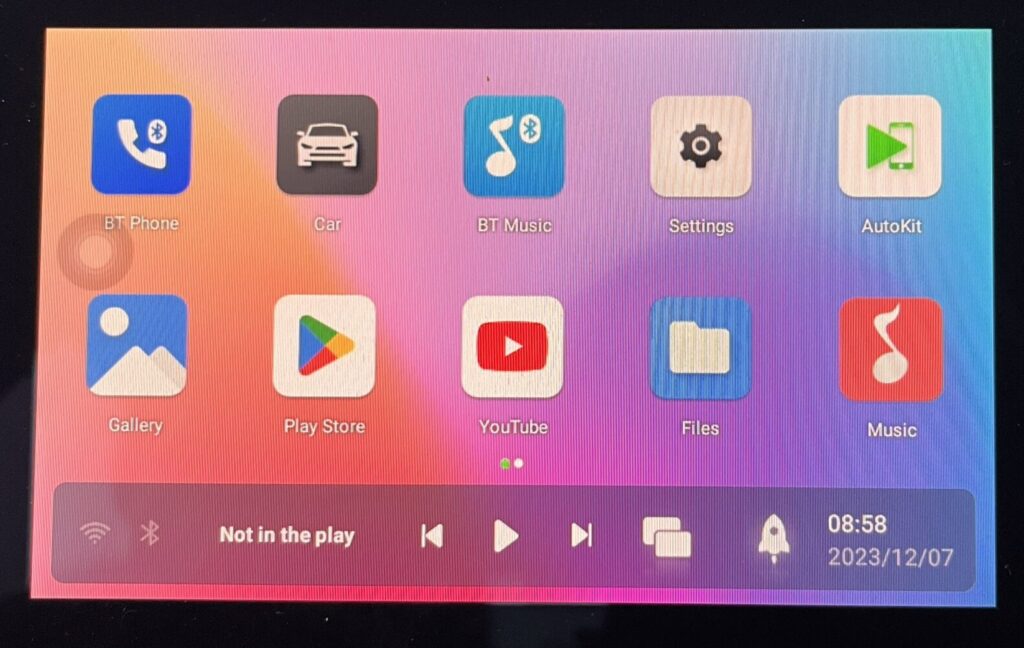
You can see a grid of icons, a little task bar down the bottom with come controls in and a dot which is by default on the right hand side of the screen but can be on the left side of the screen in the above screenshot. From left to right, the task bar has icons which tell you the Wifi/Bluetooth status, a bit of text telling you if some media is playing, media playback controls, a task switcher, a little rocket which clears running processes (useful for a device with as little RAM as this) and the date and time. The dot is the rough equivalent of the navigation bar on the bottom of an Android phone; when you press it, it expands into a Back button, a Home button, the task switcher and the same little rocket which clears running processes. This dot can be annoying sometimes, as it can be on top of a UI element that you may want to use. It is movable, however. You can move it by holding it down and dragging it somewhere else. The dot is translucent and always visible, no matter what is on the screen. The dot can also be turned off, but it makes the unit a lot harder to navigate if you do that.
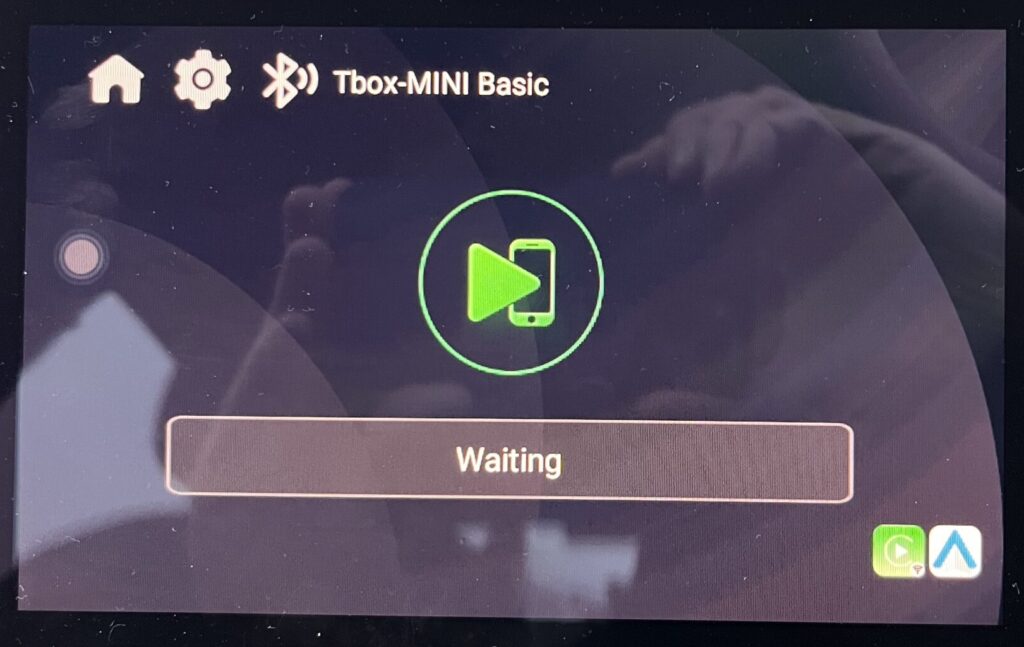
As mentioned, the primary purpose of the Tbox for me is Wireless CarPlay/Android Auto. It’s implemented using an app called AutoKit. To use Wireless CarPlay, you first need to connect your phone to the Tbox using Bluetooth. You then open the AutoKit app. The first time that you connect the phone to AutoKit, the phone detects that Wireless CarPlay is available and asks you if you want to use it. You then click “Yes” and the CarPlay interface appears on your car’s screen. AutoKit looks like this:
By default, the TBox boots to the Android launcher that comes with the device. However you can set a startup app in the device’s settings, so you can set it to automatically launch AutoKit. The setting for it is here, under “Other Settings”:

When you do that, it takes about 90 seconds for the Tbox to boot, Autokit to start, for your phone to connect to the Tbox and for CarPlay to show on your infotainment screen. My phone is an iPhone 13, newer iPhones and/or iPhone Pros may be faster to connect but I don’t have one of those so I can’t test that.
In any case, Wireless Carplay works well. The interface is responsive and if there’s any more lag when pressing buttons and swiping through screens than there is when the phone is directly connected to the car, I don’t notice it. The dials on the radio work the same way as they do when plugged in directly, and everything but the “Play/Pause” button on the steering wheel works too; the track skip buttons, holding down the Voice button to trigger Siri and the volume control works. Shouting “Siri” or “Hey Siri” also works and taking phone calls over Wireless CarPlay is no different to taking them when either connected by wired CarPlay or connected directly to the infotainment system over Bluetooth. What is noticeably slower, however, is the audio delay when playing music. There is about a delay of about a second between pressing the “Play” button and the music starting, and it takes about the same amount of time to skip tracks as well. I don’t skip tracks that often so for me at least it’s tolerable but I can see it being very annoying for someone who does skip tracks a lot. In terms of negative things, I’ve noticed that sometimes the phone disconnects from the Tbox and any audio that’s playing stops and the map stops updating. You get kicked back to the AutoKit splash screen and you have to wait about 30 seconds for the phone to reconnect and for CarPlay to start again. There’s no rhyme or reason to this, it happens at random and can happen when it’s been on for a long time or for very little time at all. I don’t know, however, if this is an iPhone problem or if it’s a problem with the device. The other thing that annoys me about it is that the phone doesn’t automatically (re)start playback of your media when the device connects, so you have to press “Play” on the screen if you want your music to resume.
As mentioned, CarPlay is only one thing that this device does. What about everything else? The first thing you need to connect the device to the internet over WiFi. When you’re not at home, that’s likely going to be tethering it to your mobile phone. WiFi is turned off by default, so you need to open the device’s Settings page first of all, then click on Wifi. That takes you to something that looks more like the standard Android settings page and you toggle WiFi on from there. The Tbox looks for wireless networks; when it finds them you select your network, type in its password and you’re off. It uses the standard Google Gboard as a keyboard, which is fine if a little unresponsive. WiFi is turned off every time the device restarts, so you have to manually reenable it if you want it on. You can change that if you want, but on balance I think that it’s sensible to leave it like that. Out of the box, it comes preloaded with three streaming apps: Netflix, Disney+ and YouTube. The TikTok app is on there too. It also comes with the Play Store so you can (in theory) download other apps as well. So how well does all of that work?
Let’s concentrate on the preloaded apps first.
Netflix functions perfectly, but slowly. Video playback is adequate and audio stays in sync with the picture for the most part. Where it’s slow is when app is loading and the responsiveness of the interface.
YouTube is much the same; video playback is fine, once you get to play the video, but starting and navigating the app can be an exercise in frustration. Are you starting to see a pattern yet?
I’ve not tried TikTok. I’ve nothing against the app, but the I don’t think the format of the videos and the constant interaction that’s required with the app to enjoy it properly is an appropriate fit for a screen that’s in the wrong orientation and that’s at arms length to you. It’s a bit of a weird choice to preload on there really.
The preloaded version of Disney+ doesn’t work. When you open the app, it detects that it’s out of date and asks you to update it. More on that in a second.
There is also a Files app, which lets you browse files on the local storage and any attached TF/MicroSD cards, a Music, Gallery and Video app where you can play or view media stored on local storage and a BT Phone and BT Music app where you can presumably play media stored on a Bluetooth connected device. They all do what they say on the tin.
So, the next thing to look at is the Play Store. Again, it’s perfectly functional but it’s slow to navigate and the slowness is nothing to do with the speed of the internet connection it has. Out of the box, when you try to install or update an app, the Play Store app downloads the app but when it tries to install, it fails. After a bit of digging, I found that Carlinkit have disabled installations of new apps out of the box. You can easily enable app installations in the page of the “Other Settings” section of the settings app but it wasn’t something I immediately noticed when I first got the Tbox and there’s no mention of that in their instruction pamphlet. Once I enabled that setting, I went back to the Play Store and tried to download some stuff, like an updated Disney+ app, BBC iPlayer, Prime Video and a couple more things. Some of them were happy downloading from the Play Store. The rest said that they weren’t compatible with my device and refused to install like that. Unfortunately, Disney+ was one of those apps.
As well as installing from the Play Store, you can put an Android APK onto a TF/MicroSD card, put the card into the device and use the File Browser on the device (That’s slow too, who’d have guessed?) to browse to it and install the APKs. There are various APK downloader sites out there so ripping an APK from the Play Store is not hard. Anyway, below is a table of the apps I have tried on this device, whether they can be downloaded from the Play Store on the device and if and how well they function:
App Name | Installs from Play Store? | Sideloaded? | Functionality Comments |
BBC iPlayer | Yes | No | Functional. Slow interface. Fluid video Sound in sync |
Amazon Prime Video | Yes | No | Functional. Slow Interface. Fluid video. Sound in sync. |
Disney+ | No | Yes | Functional. Very slow Interface. Fluid video. Sound in sync. |
Apple TV+ | No | Yes | Barely functional |
Yoto | No | Yes | Not functional. Very slow. App starts and asks you to log in, but crashes after login prompt. |
Paramount Plus | No | Yes | Functional. Very slow Interface. Fluid video. Sound in sync. |
Car Scanner | Yes | No | Functional |
ITVX | No | Yes | Functional. Very slow Interface. Fluid video. Sound in sync. |
Channel 4 | Yes | No | Functional. Very slow Interface. Fluid video. Sound in sync. |
My5 | No | Yes | Functional. Very slow Interface. Fluid video. Sound in sync. |
Almost everything works reasonably well, but almost without exception “Functional but slow” applies to everything. When there is an exception, the “functional” bit turns to “not functional” which isn’t good.
The other thing we need to be concerned about are firmware and operating system updates. Android is an operating system which has security issues, just like any other OS out there. Updating the operating system is quite easy. It can’t be done over the air but there is a support page on the Carlinkit website where you can download an operating system image. You put the image onto a TF card, rename it to “update.tar” and put it into the Tbox. The Tbox detects that there’s an OS update available to be installed and asks if you want to do it. It takes about five minutes. At the time of writing, the last update for this device was released in June 2023 which was when the device was released onto the market.
A phrase that I used earlier, “Functional but slow”, is overall a good summary of this thing. The concept is excellent. Apart from it running Android 11 (which is now three years old), I can’t fault the software design either. AutoKit works well and the other apps are standard Android apps so they’re fine. Even with Android being two versions out of date, it’s not as bad as it may sound as Android 11 is still in support, apps are still being developed for it and ultimately, the Tbox doesn’t spend an awful lot of time being connected to the internet and even when it is, the damage that it can cause is limited. The issue with this particular version of the Tbox it is that the hardware in it is massively underpowered. The Cortex A53 is an architecture that is over ten years old. Even the Raspberry Pi 4, released four years ago, has a Cortex A73 CPU in there and even that’s not what you call powerful. The CPU in the Tbox is marketed as one designed for “Industrial IoT Applications”, which suggests to me that it was never designed for this kind of implementation. Added to that, it is paired with a small amount of RAM for an Android device and has an anemic amount of storage. It doesn’t make for a particularly good experience outside of AutoKit, unfortunately. On the other hand, this device cost me £58 (€68/$72) from an eBay seller. That is about the same amount of money as a plain Wireless CarPlay dongle and it has a lot more functionality. It could be a lot worse, considering what it costs. Carlinkit also sell more expensive versions of this device, with more modern and powerful CPUs and more RAM and storage. I’d be interested to get hold of one of them and see how it compares to this.
So in summary:
The good:
- Excellent concept
- Well designed interface
- Neat little hardware package
- Using Android as an OS allows the use of a wide range of apps
- Wireless CarPlay mostly works
- Video playback works well, for the most part
- Very cheap
The bad:
- Massively underpowered hardware
- Takes a minute and a half for CarPlay to become available
- Does not automatically resume playback of music
- Slow in just about every app
- A lot of things need sideloading
- Old version of Android; how much longer will it be in support?
The downright diabolical:
- Not all of the out of the box apps function. That’s unforgiveable.

Comments