Have you ever started a project where you end up feeling that the whole damn thing is cursed? I hadn’t, until just recently.
A while ago, I decided I wanted a more powerful router than the piece of crap that BT provide with their fibre connections. A couple things have happened in the past couple of years that made me want to take this project on. Firstly, I am now a home owner. I bought my house in Scotland at the beginning of the year, I can’t believe I’ve owned it for almost a year already! Secondly, I now work permanently from home.
Since I’m now working from home and because the amount of devices on my home network seems to be growing exponentially, I want some separation between my personal devices and my work devices. I now own my own property so I have a bit more flexibility about what I run. I want something more configurable than the BT Home Hub; something that allows me to have some separate network segments and to restrict the traffic that passes between them. Plus, having a separate IoT network segment isn’t a bad idea either; IoT hardware isn’t exactly known for its high level of security. Anyway, that’s for the future. At the moment I have three work devices and I’m likely to get more thanks to working in Endpoint Engineering, I don’t want them to be accessible from the rest of the network and I don’t want them accessing the rest of my network either.
The first step was choosing the software platform. I’ve had success with OPNsense in the past so decided to use that as the software. It has a nice interface and relatively friendly community. I did look at pfSense but the interface on that isn’t as polished and they seem a bit more geared towards selling hardware these days, rather than developing their community edition. I did briefly consider the home edition of the Sophos UTM but decided against it as I don’t want to learn another new platform.
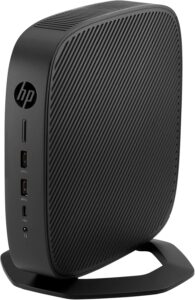
That just left getting hold of some hardware. I looked at eBay and found some HP T640 thin clients. That model has an AMD Ryzen R1505G (2C/4T) embedded CPU running at 2.4GHz, 8GB of RAM and a 32 GB eMMC storage device. It has a built in NIC and a free A keyed M2 slot. It’s passively cooled too, so no noise or fan to fail. The seller was selling it for about £40 and it was a charity selling it. So, a comically overpowered CPU, a decent amount of RAM, ample storage for a router, a spare M.2 slot for a second NIC and money going to a good cause? Perfect! Right? I certainly thought so, so I ‘won’ the eBay auction and bought the little thin client.
So a couple of days later, it was delivered. First problem: It didn’t come with a PSU. I went back to the eBay advert and reread the item description. It’s clear I didn’t read the item description properly the first time; it said that it didn’t right there. God damn it. Oh well. It just uses a 45w HP laptop adapter so it’s not a rare or hard thing to find. Back off to eBay and a PSU was ordered. It arrived, albeit more slowly than I would have liked, and both the PSU and the thin client worked. Phew.
Now that I knew that I had working hardware, I ordered a dual port network card. The on-board NIC is a Realtek RTL8111B which is fine for a desktop but I know that Linux and BSD driver support for Realtek hardware is somewhat lacking, so I wanted something better. It was a Broadcom NetExtreme, according to the product description. That’s not Intel, but I’ve used NetExtreme NICs on servers before and I know they’re better than Realtek. 2.5gbps too. That’ll do. The NIC was M keyed, so I had to buy an adapter so I could fit it it into the A/E keyed WLAN slot. I then decided to move the eMMC into the WLAN slot instead of using it for the NIC. It made more sense to do that in my view: I’m not after storage performance here, so the NIC should go in the faster slot. The SSD is only eMMC as well, so it’s not as if a PCIe x1 slot is going to be the bottleneck here anyway. In any case, I ordered both from Amazon but the sellers are in China, so I had something of a wait for them to arrive.
The adapter arrived first. It came with a couple of screws, a nut and a little screwdriver. I put it all together and put the adapted SSD into the WLAN slot and tried booting it. It worked! Hooray!
The next part to arrive was the network card. I opened the package and looked at it. It was dual port card, yes, but it’s not Broadcom. Oh no. What arrived was a card from IOCrest. It’s a friggin’ Realtek. Le sigh. Still, it’s not worth the headache to return it to China so I decided to put up with it. Then I noticed it’s a pair of RTL8111 chips sitting behind a PCIe packet switch, so it’s only gigabit. I look back at the product description on Amazon. It definitely says ‘Broadcom’ but the way it’s worded otherwise made me think it was a 2.5gbit card, but I think it was referring to the speed of the PCIe interface. Le sigh grande. But again, China… I still couldn’t be bothered to process a return so I held my nose and decided to get on with it. My internet connection is only 500mbps and it’s not as if I have any 2.5gbps hardware otherwise, so it’s not exactly a showstopper.
My thin client was a basic model which didn’t come with the expansion slot populated, so the backplate on the thin client had an embossed square on it which showed where an expansion can go. However, it’s not one that you can easily snap off so I ended up drilling it out. It looks a bit messy but there’s now a hole in the back of the thin client, which I was going run the cable from the NIC to the ports out of. I installed the card, plugged in all of the cables and ran them out, then tried to close the lid. I couldn’t. The ribbon cable that connects the ports to the M.2 card go into the top of the NIC. With them plugged in, the damned thing is about two or three millimetres too tall for the lid close properly. Well, that’s buggered that up then. I can put up with ports hanging off a cable out the back of it, but draw the line at drilling a hole in the top of the thin client or running it without its top on. So I went back to the Internet to see what alternative I can find.
I looked on eBay and Ali Express, but I couldn’t find any dual port cards where the ribbon cables plug into the back of the card instead of the top. I found a single port 2.5gbps card where they did, so I decided to use the on-board NIC as one of the interfaces and order one of those. Apparently, it was in stock in the UK, but it still took more than a week to arrive after I placed the order. The stuff from China arrived more quickly (Please don’t use Evri, people. I’ve never had a quick delivery from them). Anyway, the card eventually turned up and when it did, I installed it. It’s an A/E keyed card, so it had to go into the WLAN slot and the SSD went back to where it came from originally. I closed the lid. The eMMC still had the factory Windows 10 IoT image on it, so I booted into that to make sure that everything worked. The card was detected by Windows, it installed the driver automatically, it got an IP address and passed traffic. I was happy with that and thought that the nightmare was almost over. Oh you poor sweet summer child. I used Rufus to copy the OPNsense VGA image onto a USB stick, booted the thin client from that and attempted to install it. The installer came up with a message that said “atkbd0: [GIANT-LOCKED]” and hung. I screamed internally and went off to Google to see what was happening. It turns out there’s some sort of driver issue between a UART chip that’s installed in this kind of device and FreeBSD. It’s a simple workaround to fix though, just edit the boot loader configuration file so that it doesn’t try to load the driver during boot. I did that and tried to install OPNsense again. It got to the installer this time, but the installer complained that it couldn’t find anything to install to. It turns out that there are no FreeBSD drivers for the eMMC. I’m starting to lose the will to live here.
I went back to eBay and found a small NVMe SSD. The seller was selling it for less than £10 so it’s not the end of the world I guess. I ordered it and it arrived the next day. Hooray for Royal Mail! I installed the SSD, found my OPNsense installer and managed to install OPNsense on this device at last. OPNsense installed just fine, and booted quite happily once I changed the boot loader config file. However, it could only see one of my network interfaces. I put the eMMC back in to check if the M.2 NIC was still working. It was. I put the SSD back in and booted back into OPNsense. I logged onto the OPNsense web interface and noticed that there is a plugin available for Realtek cards. It’s supposed to include a driver for the RTL8125BG, so I installed it and rebooted OPNsense. Still nothing. I looked at the Realtek website and checked the version of the FreeBSD driver on there. It’s the same as the driver included in the OPNsense plugin. At this point, there’s a strange indent in my wall the exact same size and shape as my forehead. Funny, that. Out of curiosity, I plugged the dual port IOCrest card back in and checked to see if OPNsense detect it. It did. I also tried a live Ubuntu USB stick I have lying around with the 2.5gbit card installed. That needed a driver loading, but it still worked once it was installed. I booted back to OPNsense, hopeful that I had missed something. Nope. It just doesn’t work. So possibly the M.2 RTL8125BG I’ve got has a firmware that’s too new for the BSD driver, or it’s a newer hardware revision or something like that; I don’t know, but it seems clear that this card is not going to work with OPNsense right now.
So, what are my options here?
- Give this up as a bad idea? Bugger that! I’ve spent too much time on this to give up now. Plus, I don’t think I’d have any other use for this thin client and I doubt I’d be able to eBay it with a big messy hole in the back of it.
- Wait for the next Realtek driver release? Could do I guess, but who knows when that will be? The last one was in June, five months ago at the point of writing. The last Linux driver was released just a couple of days ago, so maybe that’s why Linux worked when BSD didn’t?
- Buy yet another NIC and hope this one is suitable? There are some Intel ones out there which go into M.2 slots, but there’s no guarantee that they’ll be any better. Driver support for Intel is a bit more widespread though, so it’s probably worth a go.
- Use a Linux firewall instead of OPNsense? Could do that I guess, I’ve got experience with the commercial version of Smoothwall and the Sophos UTM. However, that’s more from a filtering point of view rather than firewalling and I’ve never been that impressed with Smoothwall as a firewall. Maybe another like OpenWRT would be better?
- Put a hypervisor onto the thin client and install OPNsense on top of that? Well, that has the advantage of abstracting the hardware from the firewall, but it’s still an extra admin layer, it still takes resources away from the firewall and I wanted this on bare metal in any case. I won’t do that unless I have no other option.
I think I’m going to order an Intel NIC and see what happens with that. I’ll update this article when everything is in place!

Comments